Palworld save editor // what you can edit
What you can edit in a real Palworld save.
Open a complete Steam or dedicated-server world (PlZ2 / 0x32) and these edits are available in your browser. Each change is written into a copy, read back, and compared with the original before you can download it, and your own files are never modified. Tested in the game itself: a real Palworld 1.0 dedicated server loaded worlds carrying these edits to Pals, characters, inventory, guilds, and bases, and saved them back with the edits in place.
Palworld save editor // practical answer
Palworld Save Editor: inspect first, then decide.
A useful Palworld save editor should answer three questions before offering an edit: Is this the complete world snapshot? Does the tool understand this exact format and game version? Can it prove that only the intended data will change?
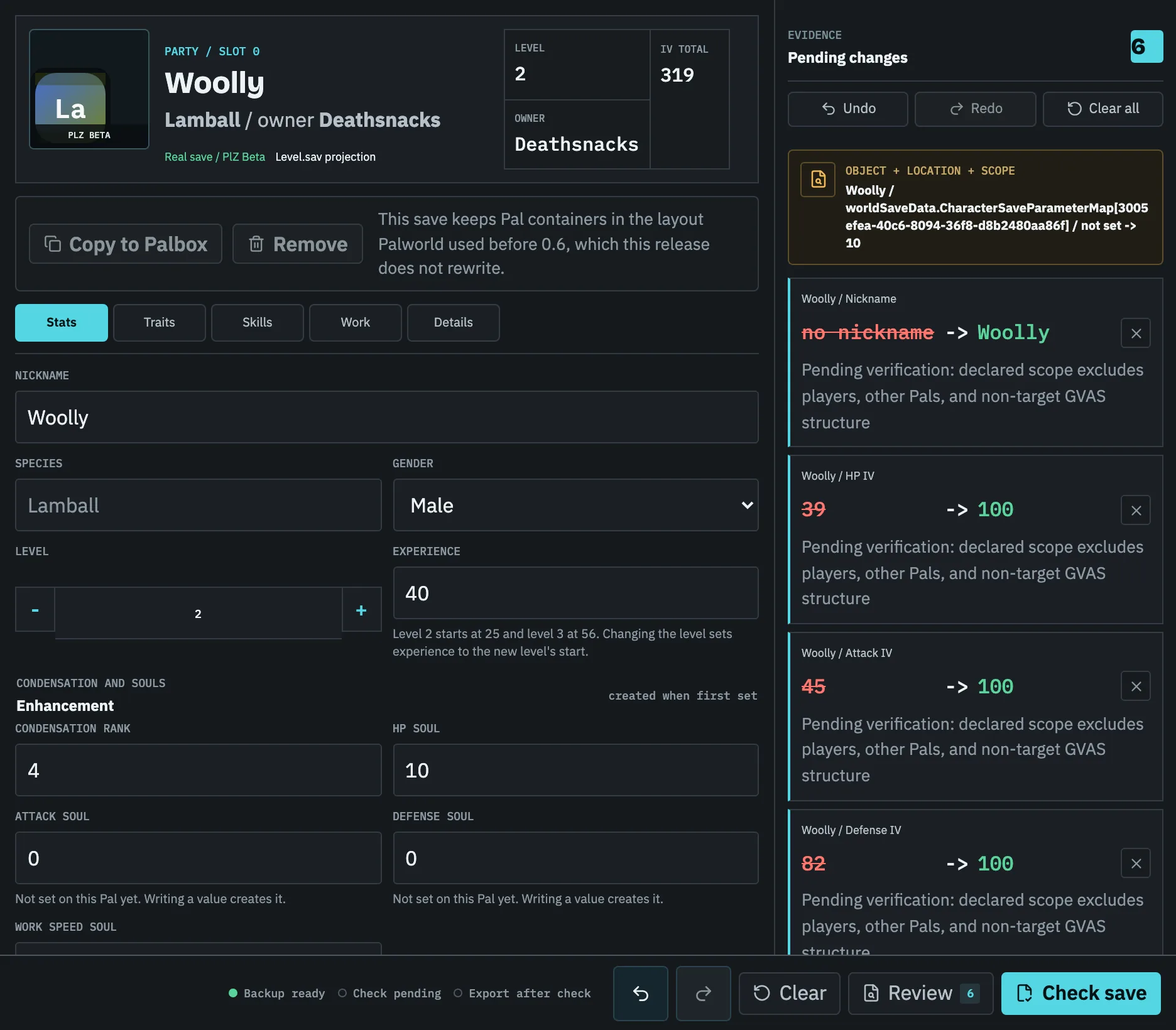
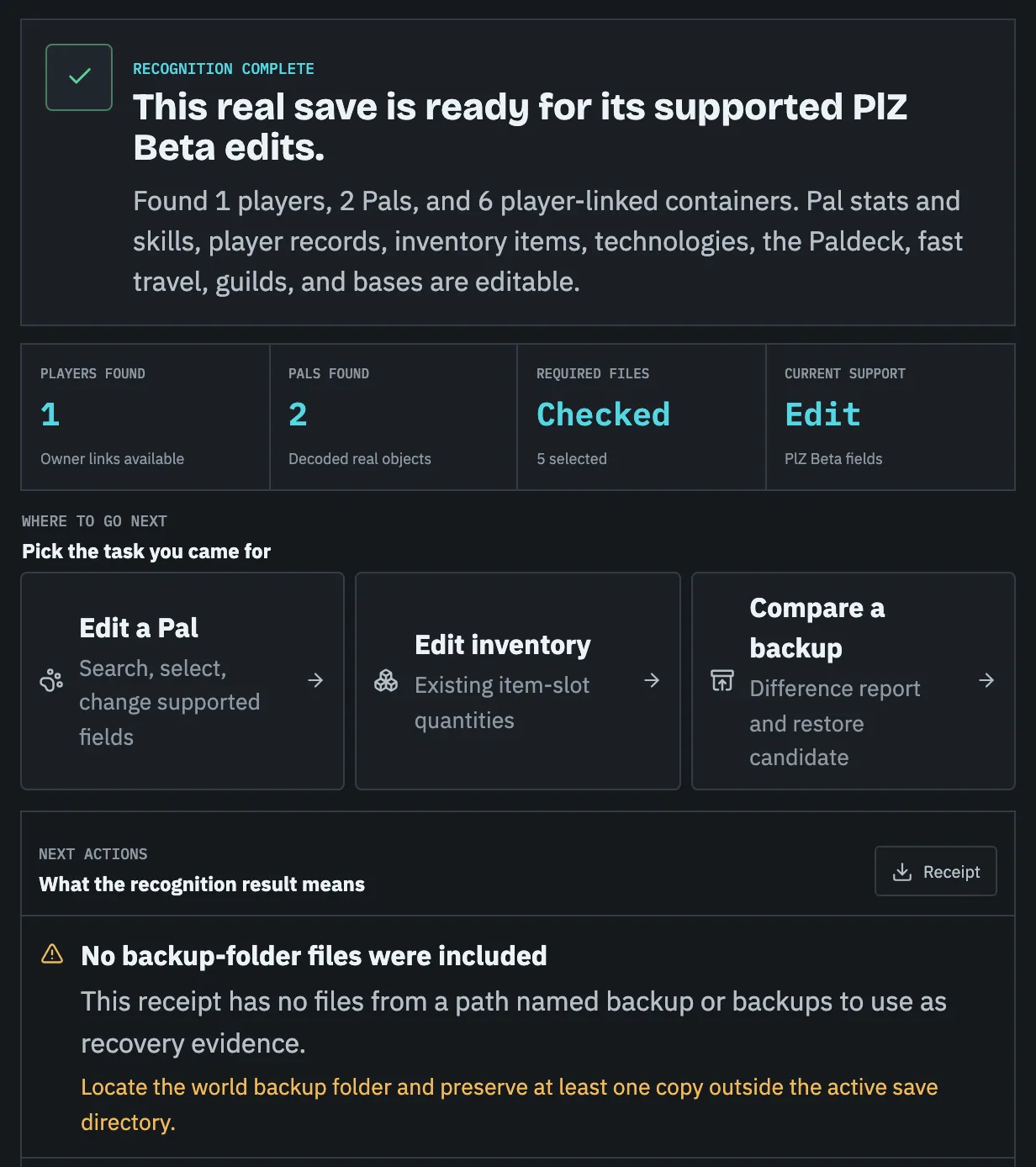
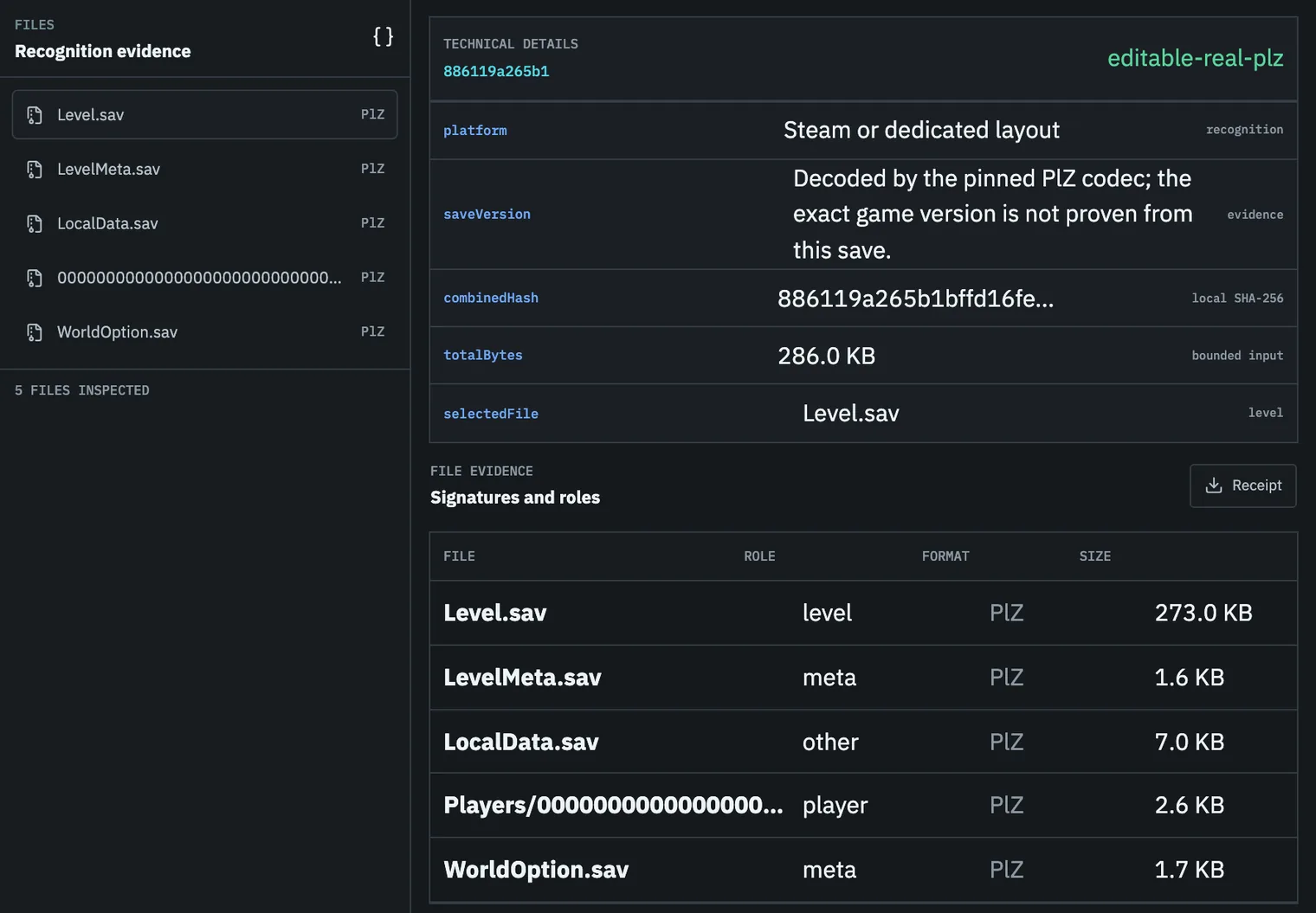
This online workbench starts with a Recognition Receipt. It records file roles, hashes, visible PlZ, PlM, CNK, and GVAS signals, backup clues, and the current capability state. The writable paths are the documented JSON fixture and PlZ Beta in complete Steam or dedicated-server PlZ2 / 0x32 worlds: Pal stats, IVs, souls, passives, and moves, and copying, moving, or giving away a Pal; your character's level and stats; inventory items; technologies, the Paldeck, and fast travel; and guild and base records. Other fields and formats stay locked.
Palworld save file checklist
Three checks matter before any save edit.
- Complete snapshotKeep matching Level.sav, Players, LevelMeta.sav, WorldOption.sav, and backups from the same write point.
- Exact capabilityRecognition is useful evidence, not proof that a Palworld save file can be safely rewritten.
- Recovery pointWork from a copy outside the live Palworld save location and retain the receipt with that backup.
Palworld save editor 1.0 support
Palworld Save Editor support is measured in five stages.
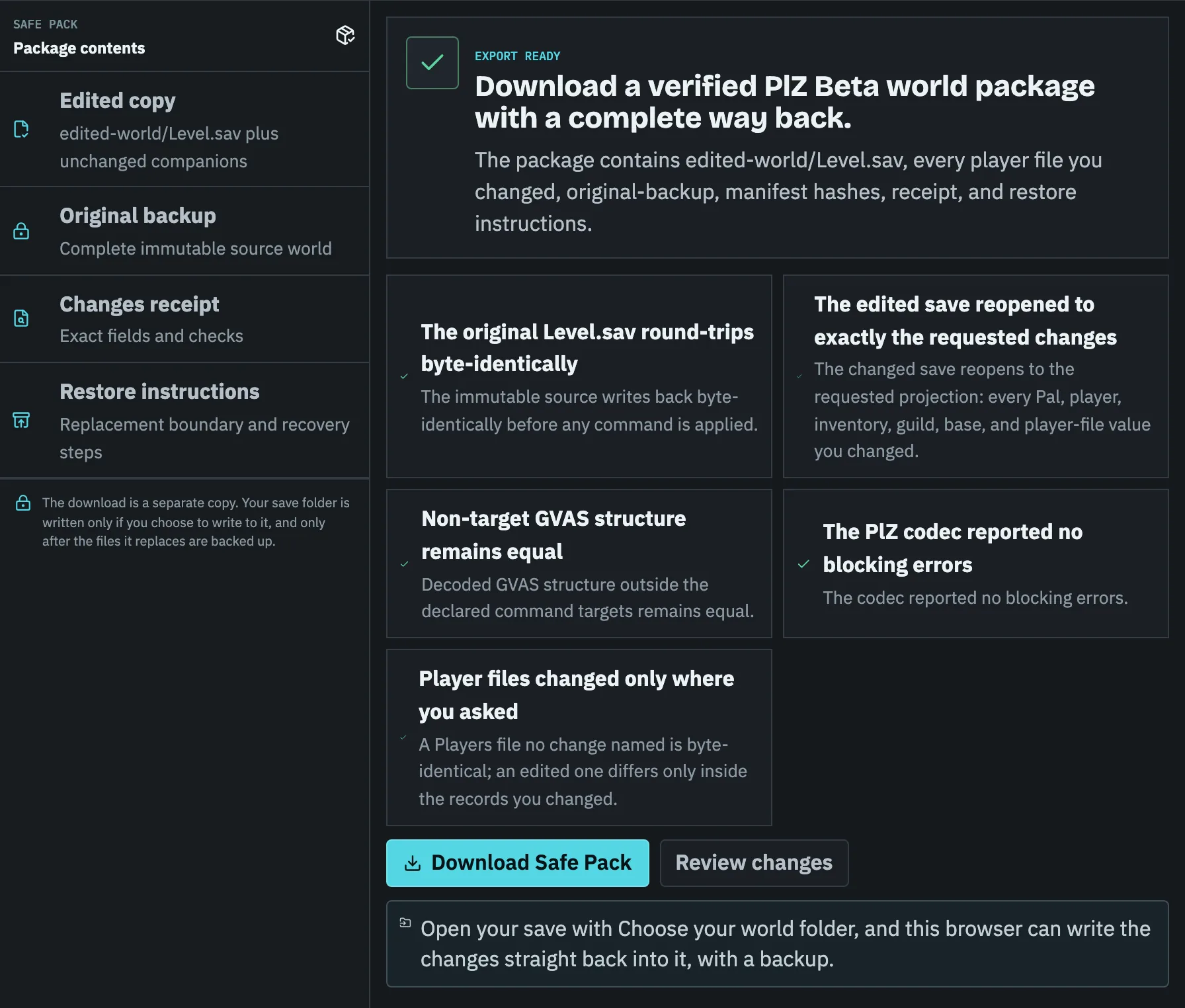
A useful compatibility statement names the last verified stage. Recognition is not parsing, parsing is not writing, and writing is not the same as a checked export you can undo.
Reversible workflow
How the Palworld Save Editor change loop works.
- 01Scan locally. Identify platform clues, file roles, format signals, missing companions, and recovery-path presence.
- 02Freeze the original. Use an in-memory clone and retain the source as the recovery point.
- 03Limit the change. Name the selected object and only the fields exposed by the active fixture or PlZ Beta session.
- 04Review the diff. Show the human impact and exact before-and-after paths.
- 05Validate and export. Keep the download blocked until every required check passes.
Current binary boundary
Real-save support is operation-specific.
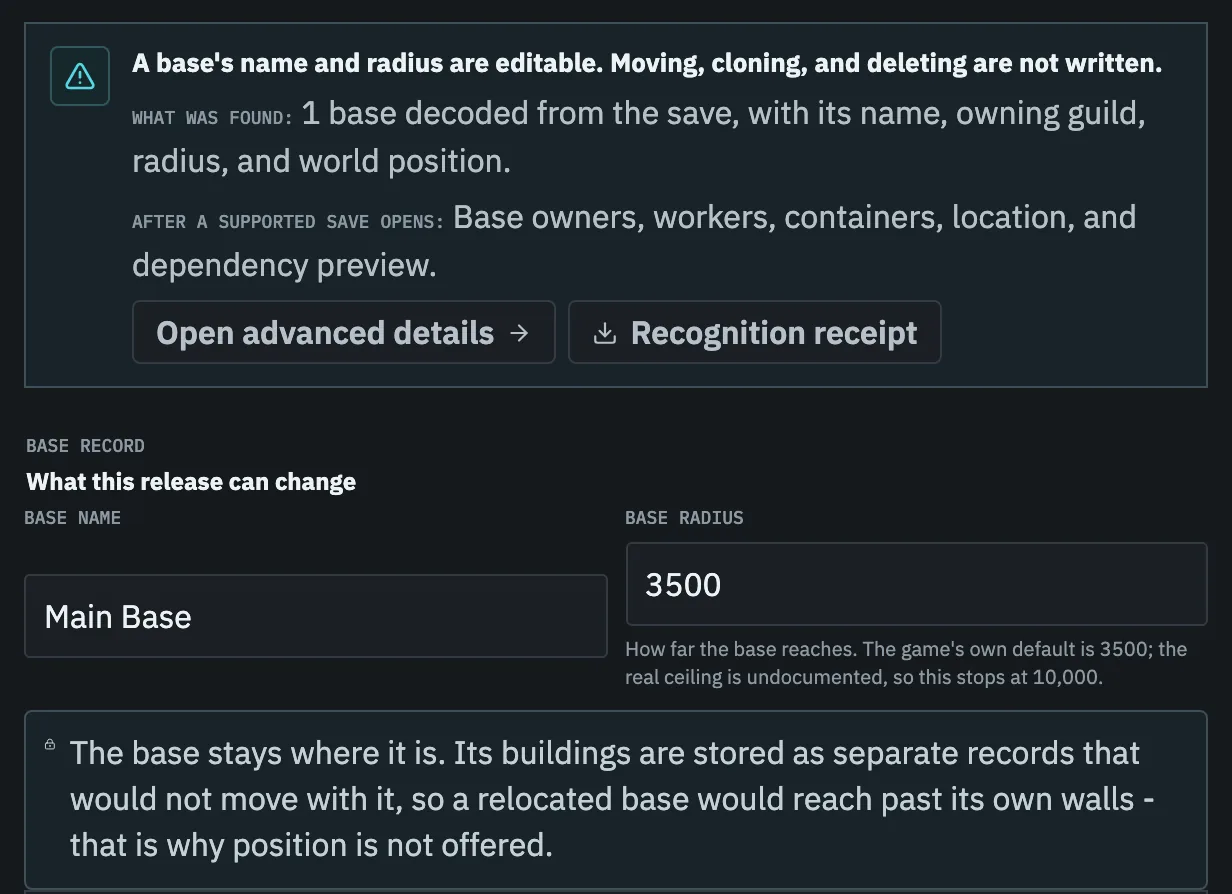
PlZ Beta publishes each writable operation separately for qualifying PlZ2 / 0x32 world saves: Pal stats, skills, and nicknames, and copying, moving, and giving away Pals; player records; inventory items; technologies, the Paldeck, and fast travel from a matching Players file; and guild and base records. Both compression containers open: PlZ and the Oodle PlM the game writes today. Species, putting a Pal to work at a base, unique weapons and armour, dynamic item data, map fog, CNK, raw GVAS, WGS, and unknown paths remain locked.
- Full input consumption before write
- Unchanged and changed round-trip tests
- Non-target region or semantic comparison
- Export re-decompression and reparse
- Compatible decoder and dependency licenses
Palworld save tools compared
PalEdit and Palworld save tools solve different jobs.
Similar names do not mean identical scope. Before downloading any Palworld save file editor, match the tool to the task, confirm the current game version, read its release notes, and keep a complete rollback copy.
Reviewed September 10, 2026
Testing evidence and sources stay visible.
The current boundary comes from local intake tests, fixture round-trip tests, pinned codec and runtime hashes, PlZ unchanged/changed round trips, non-target comparison, byte-level splice and size-prefix audits, randomized edit sequences, browser acceptance, and a written capability ladder.
Pal Save Editor is an independent fan-made project and is not affiliated with Pocketpair. PlZ Beta uses Pyodide 0.28.3, a pinned MIT codec snapshot, and a GPL-3.0 Kraken decoder for Oodle saves; the editor's source is published under GPL-3.0 at github.com/Rocniubi/pal-save-editor. CNK, raw GVAS, and WGS paths remain excluded.
Primary and upstream references
Sources used for the Palworld save boundary.
These links identify official server settings and the upstream projects discussed above. A repository description or successful decode is evidence of scope, not independent proof that every Palworld save game is safe to rewrite.
- Pocketpair dedicated server configurationOfficial setting names and supported server configuration path.
- cheahjs/palworld-save-toolsUpstream save-to-JSON converter referenced in format research.
- EternalWraith/PalEditUpstream Pal editor used to distinguish the Pal-focused search intent.
- deafdudecomputers/PalworldSaveToolsUpstream desktop toolkit used to distinguish repair, transfer, and management scope.
Search questions, direct answers
Palworld Save Editor FAQ
Can this Palworld save editor edit a real Level.sav?
Yes, within the PlZ Beta boundary. A complete Steam or dedicated-server PlZ2 / 0x32 world opens for editing in your browser. You can change a Pal's level, experience, HP, Attack, Defense, and Melee IVs, work speed, sanity, fullness, condensation rank, souls, gender, nickname, passive skills, and moves; your character's level, experience, name, and stats; inventory items, including adding, removing, and moving them between containers; and guild and base names, camp level, and base radius. Add your Players file to also edit technology points, unlocked technologies, the Paldeck, and fast travel. With the Players files open, a Pal can also be copied into its owner's Palbox, removed from one, moved between party and Palbox, or given to another player. The browser keeps the original unchanged, reparses the edited copy, compares non-target data, and exports a Safe Pack. An Oodle-compressed save - what the game has written since 0.6 - is decompressed in your browser and exported as a zlib save the game also loads. Species, putting a Pal to work at a base, unique weapons and armour, map fog, CNK, raw GVAS, and WGS stay read-only.
Does the Palworld save file leave my browser?
No. This is a static Cloudflare Pages site with no save upload API, account system, or database. File inspection, ZIP reading, hashing, snapshot comparison, and receipt generation run inside your tab. Raw file bytes are released when you close it.
Which Palworld save files should stay together?
Stop your game or server, then copy a complete matching WorldID folder. Keep Level.sav, its Players directory, LevelMeta.sav when present, WorldOption.sav, and backup folders captured at one write point. For PC Game Pass, preserve a full WGS directory away from any live path.
Where is the Palworld save location on Steam, Game Pass, Linux, and servers?
Exact Palworld save location depends on platform and host. Steam commonly stores worlds below a local Pal/Saved/SaveGames path, Game Pass uses opaque WGS containers, Linux servers use a configured server data path, and managed hosts expose files through their control panel or SFTP. Use our dedicated save location guide before selecting a folder.
Does Palworld save editor 1.0 mean every 1.0 save is compatible?
No. Version 1.0 is a game release label, not a universal compatibility guarantee. Support must be verified by platform, outer container, inner data, file role, intended edit, parser version, and round-trip result. This site reports those stages separately.
What is the difference between PalEdit, PalworldSaveTools, and palworld-save-tools?
They are separate third-party projects. PalEdit focuses on editing or generating Pals. PalworldSaveTools is a broader desktop toolkit for repair, transfer, editing, and management. cheahjs palworld-save-tools converts supported .sav data to JSON and back. Pal Save Editor is this browser workbench, with local recognition, fixture editing, and PlZ Beta editing of Pals, players, inventory, guilds, bases, and player progress in real saves.
Can this Palworld WorldOption.sav editor change server settings?
It can recognize and inventory a real WorldOption.sav, but it does not rewrite binary data today. Use Pocketpair's documented server configuration when a setting belongs in PalWorldSettings.ini. If a host requires WorldOption.sav, stop your server, back up its complete WorldID, and use a tool with explicit current-version support and a tested restore path.
Can the Pal editor add passives or create Bellanoir Libero?
It can add, remove, and replace passive skills and moves on the Pals already in a real save: pick from the passives other Pals in your world carry, or type a passive id from the game. It does not make a Pal from scratch or change a Pal's species, so it cannot spawn Bellanoir Libero or any Pal your world does not already hold; a Pal your world does hold can be copied into its owner's Palbox.
Is a Palworld save editor the same as Palworld mods or cheats?
No. A save editor changes persisted game state while the game is stopped. Palworld mods alter installed or runtime behavior, and Palworld cheats may use admin commands, trainers, or memory tools. A Nexus Mods listing is a distribution page, not proof of current save compatibility; verify the author, release, supported game version, source, and rollback instructions.
Can I inspect a dedicated Palworld save game from GPORTAL?
Yes, after you stop the server and download a complete matching world snapshot from GPORTAL or another host. Include Level.sav, Players, world options, metadata, and backups. The browser can inspect and compare the local copy. A recognized PlZ2 / 0x32 world opens for PlZ Beta editing, and the export is a Safe Pack with the edited files, the original backup, and restore steps to upload back to the stopped server.
Can this tool unlock the Palworld map or alter map progress?
Partly. With your Players file added, the player editor can lock or unlock the fast-travel points your save already records and register Pals in the Paldeck. It does not reveal the map: fog of war is a mask of about four million cells that this release does not rewrite, and a fast-travel point the save has never recorded cannot be unlocked.
Why are most real Palworld save writes locked?
Most everyday edits are open now; what stays locked is what could quietly break a world. A trustworthy operation needs compatible decoder licensing, bounded parsing, unchanged and changed round trips, export re-decompression, and non-target comparison. Pals, players, inventory, technologies, the Paldeck, fast travel, guilds, and bases have all of that evidence in PlZ Beta. So do copying, removing, moving, and giving away a Pal. Species changes, putting a Pal to work at a base, unique weapons and armour, map fog, and unsupported formats do not, so they remain blocked instead of inheriting that result.
Do I need the Players folder to edit my Palworld save?
For Pals, your character, guilds, and bases, Level.sav is enough. Add the matching Players/<id>.sav files to edit inventory, because they record which containers belong to which player, and to edit your progress: technology points, unlocked technologies, the Paldeck, and fast travel live in that file, not in Level.sav.
What is the safest first step before any Pal edit?
Stop every process that can write the world, preserve a complete backup outside the live path, open the local copy, and read the Recognition Receipt. Continue only when the exact field is enabled for that save, and keep the Safe Pack's original backup alongside your world.