Pal record change plan
Palworld Pal Editor changes one Pal with visible scope.
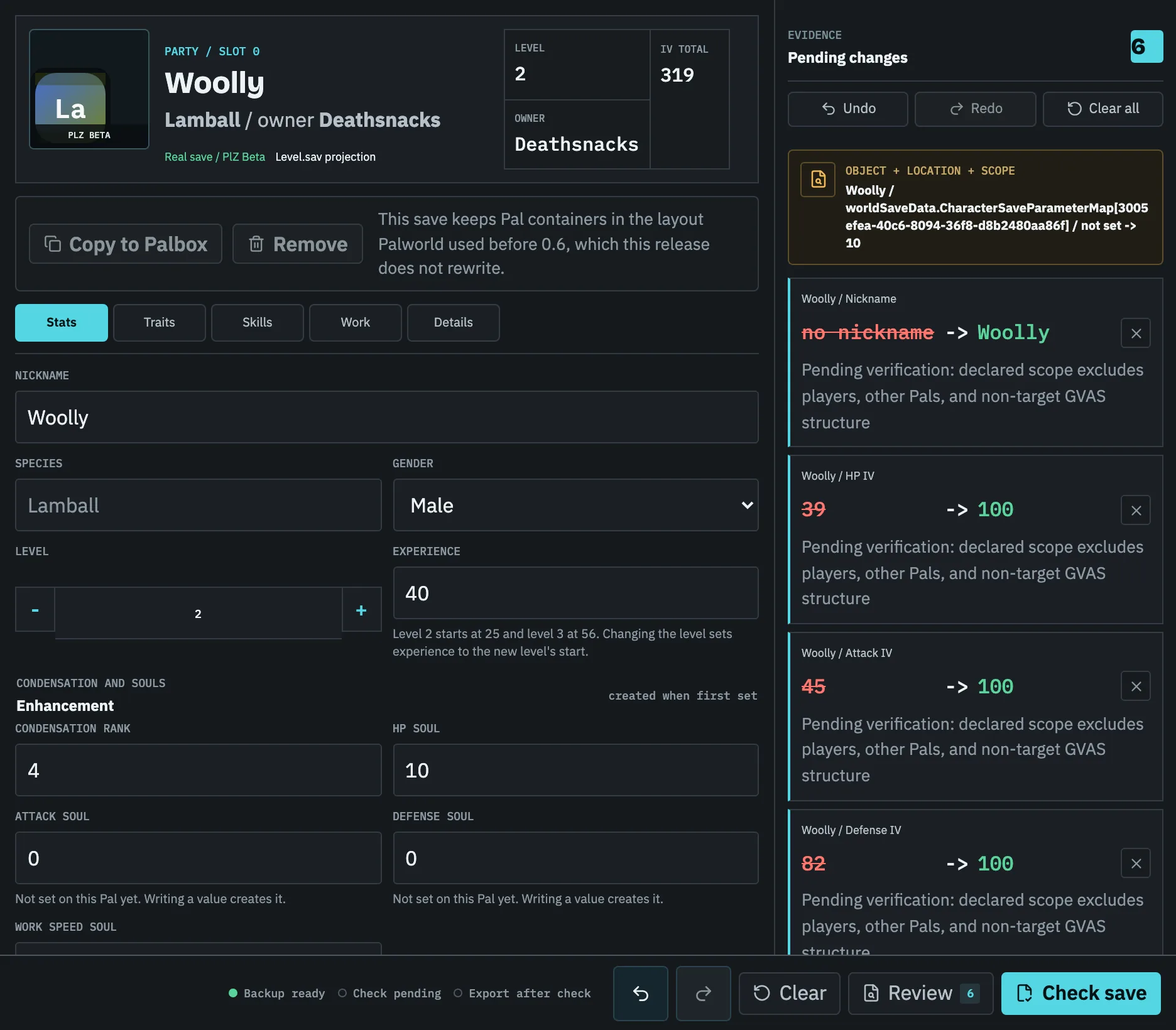
The live editor shows exactly which Pal and fields are affected. Fixtures expose their documented fields; qualifying PlZ Beta worlds expose named Pals and their level, experience, IVs, work speed, sanity, fullness, condensation, souls, gender, nickname, passive skills, and moves.
Before you touch the field
The Pal identity is the first control.
- Use the editable sample or a documented Pal Save Editor JSON fixture for the broader fixture field set.
- A qualifying PlZ2 / 0x32 Level.sav exposes named Pals: change level, experience, IVs, work speed, sanity, fullness, condensation, souls, gender, and nickname, and add or remove passive skills and moves.
- The fixture workflow freezes the source model, lists every changed path, validates the owner reference, and exports the original beside the changed JSON.
- The PlZ Beta workflow reparses the changed copy and checks that every other Pal and record is unchanged.
What the editor changes today
Fixtures keep their documented nickname, level, work speed, IV, and active-skill controls. PlZ Beta changes a Pal's level, experience, the four IVs, work speed, sanity, fullness, condensation rank, souls, gender, and nickname, and adds or removes passive skills and equipped or mastered moves. A property the Pal does not carry yet, such as a nickname or a soul, is created in exactly the shape the game writes it.
With the owners' Players files open, a Pal can also be copied into its owner's Palbox, removed from one, moved between party and Palbox, or given to another player, and a level change writes the experience that level starts at.
A five-step change
Edit one Pal from intake to Safe Pack
Start with a stopped game and a copied world. The editor's Pal list is an evidence view: select the record by its displayed name, owner, location, and current values, then make one small change before attempting a broader plan. The pending-change row should make the target and before-and-after values unambiguous.
- 01
Open a safe copy
Stop Palworld or the server, copy the complete matching world, and open the copy from the Pal Editor route.
- 02
Confirm the Pal identity
Use the name, owner, party or Palbox location, and current level to distinguish the intended record from another Pal with a similar name.
- 03
Make one scoped change
Change a supported field such as level, an IV, a soul, nickname, passive, or move; do not mix an identity or species change into the same plan.
- 04
Run Check save
Review every pending row and wait for the owner, legal-value, scope, changed-reparse, and non-target checks to pass.
- 05
Test before replacing the live world
Download the Safe Pack, keep its original backup, and load the edited copy in game before retiring any recovery point.
Boundary
What is still locked
Species, putting a Pal to work at a base, the fixture active skill, unique weapons and armour, dynamic item data, container ownership, guild membership, base position, map fog, CNK, raw GVAS, WGS, and other writes remain locked. A PlM/Oodle save is no longer among them: it is decompressed locally and written back as a zlib save the game also loads. Every Safe Pack carries an immutable backup of the original files.
Before you continue
Pal edit safety checklist
- 01Stop the game or server before copying.
- 02Confirm the selected Pal identity and owner.
- 03Keep level, IV, soul, and condensation values inside supported ranges.
- 04Review every changed path and before-and-after value.
- 05Keep the Safe Pack original backup until the edited copy loads in game.
Specific answers
Questions before changing a Pal
Can I make a perfect Pal here?
Close to it. PlZ Beta can set a Pal's IVs, level, experience, souls, and condensation rank, and choose its passive skills and moves from the ones your save already contains or ids you type. It does not change species or put a Pal to work at a base.
Does Palworld Save Editor change all Pals at once?
No. You edit one Pal at a time, and every changed field appears as its own pending change with its exact path.
What should I do when the wrong Pal is selected?
Cancel the pending changes, compare the displayed owner, location, level, and current values, then select the intended record again. Never continue based on nickname alone because multiple Pals can share one.
Why is Check save still locked after I changed a value?
The selected input may be read-only, the value may be outside its legal range, the owner reference may be incomplete, or a required companion Players file may be missing. Keep the original untouched and resolve the reported condition before export.
Can I undo a Pal change after downloading?
Keep the Safe Pack's original backup beside the edited copy. To undo the exported result, restore that original backup while Palworld is stopped; the browser's undo control only applies to the current editing session.