Inventory change control
Palworld Inventory Editor with container-scoped item changes.
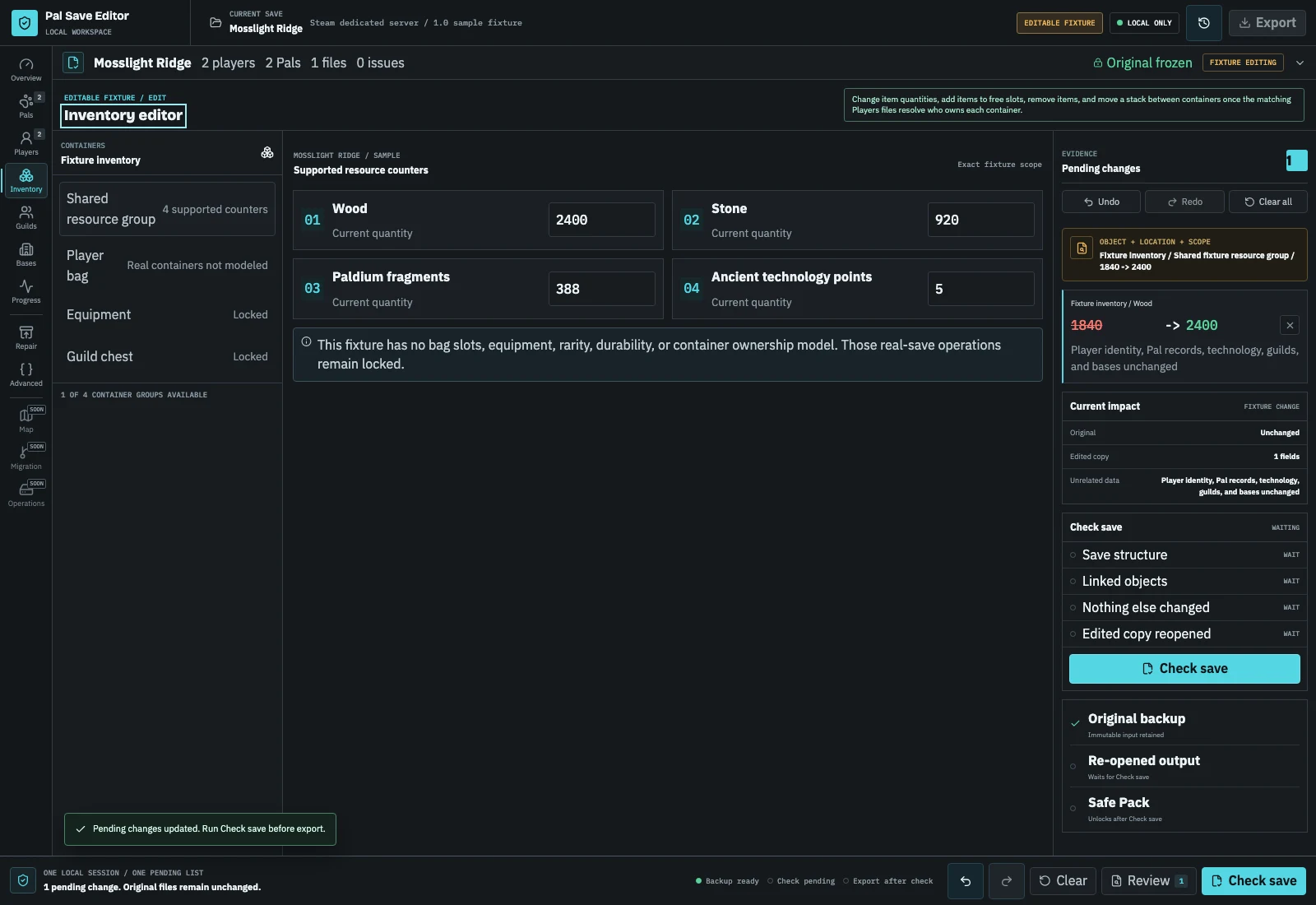
The editable sample and Pal Save Editor JSON fixtures expose wood, stone, Paldium fragments, and ancient technology points. In PlZ Beta, a complete Level.sav plus the matching Players files lists each player's six linked containers: change a stack's quantity, add an item to a free slot, remove an item, or move a stack to another container. Unique weapons and armour, dynamic item data, and ownership stay untouched.
Open Inventory editorChoose one operation
Every item change has a different stop condition.
Inventory edits stay tied to an owner, container, slot, item id, and quantity. The operation menu keeps those boundaries visible before a command enters Pending changes.
Operation evidence
From slot selection to exact diff.
The editor shows the selected owner and container, then compares source and destination slots after serialization. A stack cannot appear twice, disappear from both containers, or bypass ownership checks.
- A complete PlZ2 / 0x32 Level.sav plus the matching Players files resolves each player's six linked containers and every slot in them.
- Each operation names the exact owner, container, slot, and source path: a quantity from 1 to 9,999, an item added to a free slot, an item removed, or a stack moved.
- A move is one undoable step, so an item is never left in both containers or in neither.
Inventory evidence
What inventory evidence is available today
The editable fixture model contains four inventory counters and exposes them as a dedicated module. Every change appears as an exact inventory path and must pass integer range, scope, and round-trip checks.
In PlZ Beta, the matching Players file supplies six container IDs. Level.sav supplies the corresponding slots, item IDs, quantities, owner context, changed reparse, and non-target preservation checks. Inventory edits never change the Players file itself.
| Input | Available inventory evidence | Inventory edit or export |
|---|---|---|
| Editable sample | Four documented counters | Allowlisted quantities + safe pack |
| Pal Save Editor JSON | Documented fixture inventory | Allowlisted quantities + safe pack |
| Real Level.sav + matching Players | Six linked containers and every slot | Quantity, add, remove, move + Safe Pack |
Inventory evidence
Four inventory edits, four different checks
Inventory changes are intentionally small and explicit. Start by selecting the player and container, then choose exactly one operation. The editor should show the source slot, destination slot when relevant, item id, quantity, and owner before it adds the command to Pending changes.
For example, changing a Common inventory stack from 120 to 240 changes one StackCount. Adding wood fills a free slot; removing stone clears one selected slot; moving a Paldium stack transfers the whole stack to an allowed destination. Each operation is checked again after serialization so an item cannot silently appear twice or disappear from both containers.
| Operation | Example input | Expected result | Common stop condition |
|---|---|---|---|
| Change quantity | Common / slot 04 / Wood 120 -> 240 | One StackCount path changes | Quantity is not an integer or exceeds 9,999,999 |
| Add item | Free slot / Stone | A new stack occupies one free slot | No free slot or unknown item id |
| Remove item | Drop container / Paldium | Selected slot becomes empty | Slot is missing, empty, or not owned |
| Move stack | Common / slot 04 -> another allowed container | Source clears and destination receives the full stack | Destination is disallowed or already occupied |
Slot-level procedure
Four inventory edits, four different checks
Inventory changes are intentionally small and explicit. Start by selecting the player and container, then choose exactly one operation. The editor should show the source slot, destination slot when relevant, item id, quantity, and owner before it adds the command to Pending changes.
- 01
Open the complete world copy
Stop writes and include Level.sav plus the matching Players files so the editor can resolve player-owned containers.
- 02
Select owner and container
Confirm the player, container type, slot, item id, and current quantity before choosing an operation.
- 03
Apply one operation
Set a quantity, add an item to a free slot, remove a selected stack, or move a whole stack to an allowed destination.
- 04
Inspect the exact diff
Check the before-and-after slot contents and ensure no unrelated player's inventory or equipment appears in Pending changes.
- 05
Run checks and test the Safe Pack
Export only after legal values, scope, changed reparse, non-target comparison, and backup checks pass; load the copy in game before replacing the live world.
Boundary 01
Why bulk inventory edits are risky
A save can contain several inventory-like containers. A global search-and-replace can touch player bags, equipment, base storage, key items, another player's data, or references that are not item quantities. The live operation therefore identifies the exact owner, container, slot, and StackCount path before it exposes a value, and rejects missing containers, missing slots, empty slots, unknown targets, and out-of-range values.
Boundary 02
Legal values and item identity
Palworld reserves every slot a container will ever have, so adding an item fills a free slot rather than growing the container. The item ids already present in your save are offered first, and a typed id is checked for shape. Quantities are whole numbers from 1 to 9,999,999. Moving takes the whole stack to the first free slot of another container: always a Common inventory, and any other container only when it already holds that item. Unique weapons and armour, dynamic item data, equipment metadata, and ownership remain outside this allowlist.
Boundary 03
Chests, shelves, and boxes in a base
Base storage opens from the Base editor, one base at a time: its chests, shelves, boxes, barrels, and containers then appear beside the player containers, and the same four edits apply, including moving a stack between a player's bag and a chest. Food boxes, medicine boxes, production buildings, and anything with per-slot rules stay closed.
Boundary 04
What an inventory export receipt proves
The real-save receipt identifies each player-linked container and slot, the item, the exact before-and-after contents, changed reparse, non-target comparison, unchanged Players file bytes, and the immutable original backup.
Before you continue
Inventory edit safety checklist
- 01Stop the game or server before copying.
- 02Include Level.sav and the matching Players files.
- 03Select the exact player, container, slot, and item.
- 04Use integer quantities inside supported limits.
- 05Review source and destination slots for move operations.
- 06Check unrelated inventory groups and equipment remain unchanged.
- 07Keep the original backup until the edited copy loads in game.
Specific answers
Questions before changing inventory
Can I add any item by name?
Yes, into a free slot of a container you own: pick one of the item ids already in your save, or type an id from the game. The editor checks the id's shape rather than a full item catalogue, so an id the game does not know may simply be ignored.
Will this edit move or create storage items?
Only when you ask it to. Adding fills a free slot, and moving takes a stack from one container to another in a single undoable step. Dynamic item data, ownership, and the Players file stay unchanged, and unique weapons and armour are never moved.
Why can I see a container but not add an item?
The container may have no free slot, may not be owned by the selected player, or may use per-slot rules outside the allowlist. Keep the operation read-only instead of forcing a new slot into the save.
Does moving a stack split it?
No. The live move operation transfers the whole stack in one undoable command. Use a quantity change first if you need a smaller stack and the selected item supports that operation.
Can I edit unique weapons, armour, or durability?
No. Those records carry dynamic data and durability fields that are outside the current preservation proof. They remain visible for diagnosis but are not exposed as writable inventory fields.
What should I check after an inventory export?
Load the edited copy with the game stopped on the original world, then verify the selected player's bag, the destination container, equipment, other players' inventories, and the Safe Pack receipt before replacing the live files.