Player identity first
Palworld Player Save Editor with a visible change plan.
Open a complete world and edit your character: level, experience, name, work speed, sanity, and fullness live in Level.sav, while technology points, unlocked technologies, the Paldeck, and fast travel live in your own Players/<id>.sav. Both are written with exact-path diff, validation, backup, and receipt export. Identity and ownership stay untouched: the editor matches PlayerUID across the two files but never rewrites it.
Open Player editorOperation evidence
One player, two files, one review.
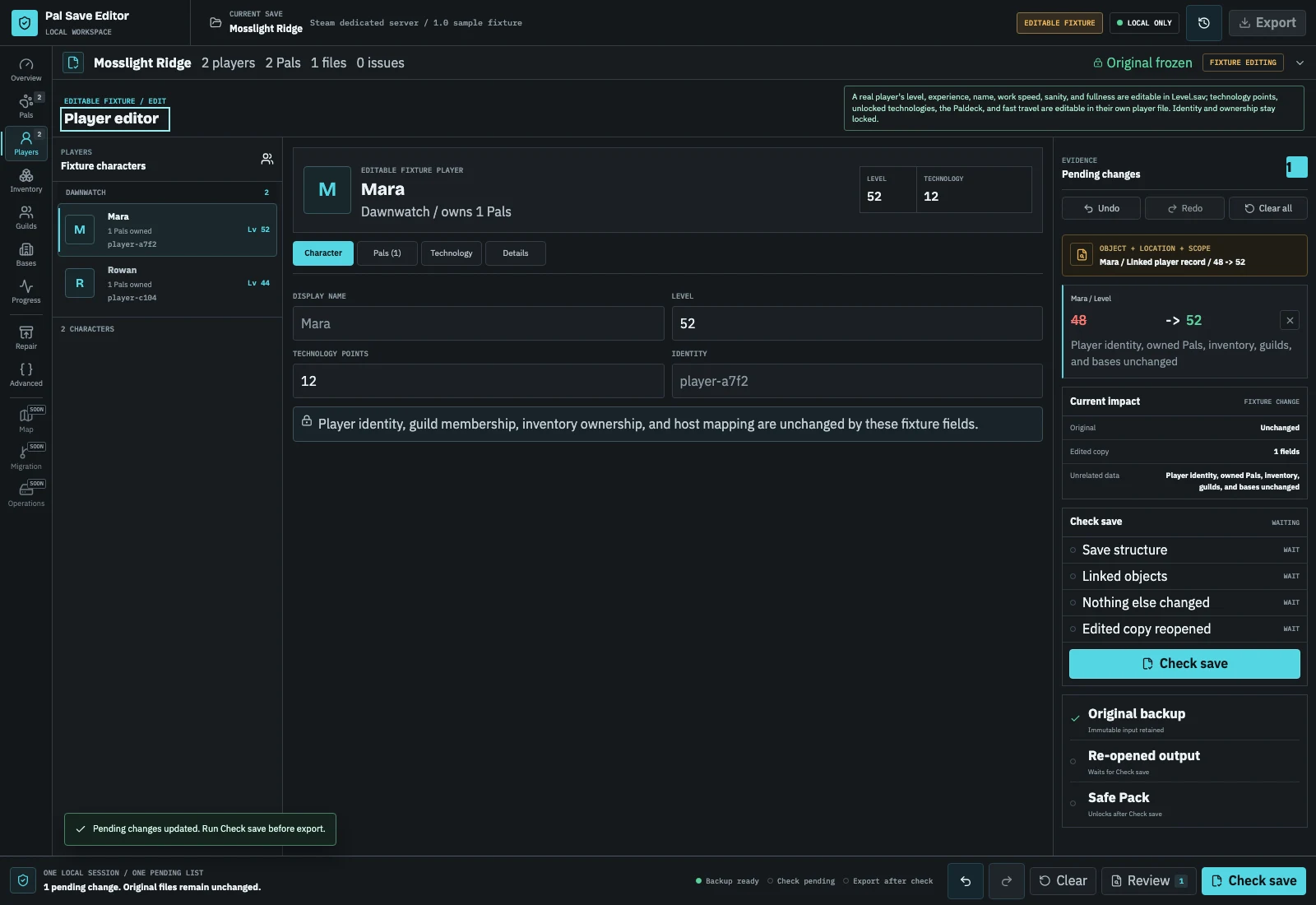
Player edits are safe only when the character record and its progress companion resolve to the same stable identity. The preview below shows the kind of cross-file change plan the editor must make explicit before export.
- Your character's level, experience, name, and stats are written into its record in Level.sav, with the same checks as a Pal edit.
- Technology points, unlocked technologies, the Paldeck, and fast travel are written into your own Players/<id>.sav, which is matched to Level.sav by PlayerUID.
- Level.sav alone is enough for your character's record; technology, the Paldeck, and fast travel need the matching Players folder, because identity and ownership references cross file boundaries.
File boundary
What the browser can and cannot read today
A complete PlZ2 / 0x32 world decodes each player's character record from Level.sav and pairs it with the matching Players/<id>.sav by PlayerUID. The editor shows the player's name, level, owned Pals, inventory containers, technology points, unlocked technologies, Paldeck, and fast-travel points.
Level, experience, name, work speed, sanity, and fullness are editable in Level.sav. Technology points, unlocked technologies, the Paldeck, and recorded fast-travel points are editable in the player's own file. The PlayerUID, GUID, appearance, and ownership links are read to keep the two files together, never rewritten.
Status points spent on each stat and the points left to spend are editable in Level.sav too, ancient technology points in the player's own file, and a level change writes the experience that level starts at.
| Input | Available evidence | Player edit or export |
|---|---|---|
| Editable sample | Named fixture players and owner references | Level and technology points |
| Pal Save Editor JSON | Documented fixture model | Allowlisted fixture fields + safe pack |
| Real Players/*.sav | Technology, Paldeck, fast travel, inventory ownership | Technology points, unlocks, Paldeck, fast travel + Safe Pack |
| Real Level.sav | Named players and their character records | Level, experience, name, work speed, sanity, fullness |
File boundary
Example: change player progress without changing identity
A safe player edit separates the character record from progress stored in the matching Players file. For a level change, the editor updates the character record in Level.sav. For technology points or Paldeck registration, it targets the player's own Players/<id>.sav after matching PlayerUID; it never guesses from a display name.
A concrete plan might set Mara from level 42 to 45 and unlock one technology. The change preview should show one Level.sav path and one player-file path, while PlayerUID, GUID, owned Pals, guild membership, and bases remain unchanged. If the matching file is missing or duplicated, the correct result is a blocked export.
| Task | Target file | What must stay unchanged | If evidence is missing |
|---|---|---|---|
| Level or experience | Level.sav | PlayerUID, GUID, ownership | Block export |
| Name or character stats | Level.sav | Other players and Pals | Block export |
| Technology points or unlocks | Players/<id>.sav | Player identity and world links | Require matching Players file |
| Paldeck or fast travel | Players/<id>.sav | Unrelated progress records | Keep read-only |
Cross-file procedure
Example: change player progress without changing identity
A safe player edit separates the character record from progress stored in the matching Players file. For a level change, the editor updates the character record in Level.sav. For technology points or Paldeck registration, it targets the player's own Players/<id>.sav after matching PlayerUID; it never guesses from a display name.
- 01
Freeze both file groups
Stop the game or server and copy Level.sav, the complete Players folder, metadata, and world options from the same write point.
- 02
Select the player by identity
Match the displayed player to PlayerUID, GUID, owned Pals, and file role; do not rely on a duplicated display name.
- 03
Choose the correct data domain
Use the character controls for level, experience, name, and stats; use the progress controls for technologies, Paldeck, or recorded fast travel.
- 04
Review the cross-file plan
Confirm that only the intended Level.sav and Players/<id>.sav paths appear and that identity and ownership fields are unchanged.
- 05
Validate and verify in game
Run the checks, keep the Safe Pack backup, then verify the character, inventory, Pals, technology, and Paldeck on a test copy.
Constraint 01
Why a player file cannot be edited in isolation
Palworld stores important player relationships across the individual player save and world data. A change that preserves the file but loses the world-side mapping can look like a brand-new character at login. The complete world is required to prove which identities and ownership links belong together.
Constraint 02
Safe player change requirements
A future change plan must identify the exact player through file role, PlayerUID, GUID, and world references; list owned Pals, guild membership, bases, storage locks, and other dependent records; and block export when an identity is duplicated, missing, or ambiguous. The editor already refuses duplicate or mismatched PlayerUIDs when it opens a world; rewriting an identity or moving ownership is not live in this release.
Constraint 03
Host characters need special handling
A co-op host may not map like a normal client character during dedicated-server migration. Host transfer should be a dedicated mission with explicit identity confirmation, not a checkbox inside a generic level editor.
Before you continue
Player edit safety checklist
- 01Stop the game or server before copying.
- 02Include Level.sav, the complete Players folder, and companion files.
- 03Map by PlayerUID and GUID, not display name.
- 04Review the exact file paths in the change plan.
- 05Verify guild, base, Pal, inventory, and progress ownership after the change.
- 06Keep the original player files and world backup together.
Specific answers
Questions before changing player data
Why did my character reset after transfer?
The target server likely created or selected a different player identity. The old data may still exist under another GUID.
Can I edit only player level here?
Yes. Change just the level, or any other supported field, and only that field appears as a pending change with its exact path. The same works on the editable sample and a Pal Save Editor JSON fixture.
Do I need Players/<id>.sav to change my level?
No. The character's level, experience, name, work speed, sanity, fullness, and status points are in Level.sav. You need the matching Players file for technology points, unlocked technologies, Paldeck registration, fast travel, and inventory ownership.
What happens when two files have the same PlayerUID?
The identity check should stop the workflow. Do not choose one arbitrarily; preserve both files, record their paths and timestamps, and resolve the duplicate from the complete world and a known backup.
Can this page transfer ownership to another player?
No. Identity, Pal ownership, guild membership, base ownership, and appearance rewrites remain locked. Use the dedicated migration guidance and keep both source and target worlds until every identity is verified.